Inviting Office Side Users
Office-side users are staff members who need access to the administrative features of RakefetOnline, such as office personnel, clergy, board members, accountants, or other authorized users. These users receive permissions based on the role assigned to them.
Unlike member logins, office-side users are invited directly through Manage Users and are not linked to a family profile.
What Office Users Can Access
Depending on their assigned role, office users can:
Search for families and individuals
View and manage Yahrzeit information
Create email and print templates
Send text messages and announcements
Run reports based on their permissions
Access administrative features assigned to their role
Note: Access is controlled entirely by the selected user role. Users only see the features and data their role allows.
Before You Begin
If someone is both an office user and a member, they must use two different email addresses:
One email for their Member Portal login
One email for their Office login
A single email address cannot be used for multiple permission roles.
How to Invite an Office User
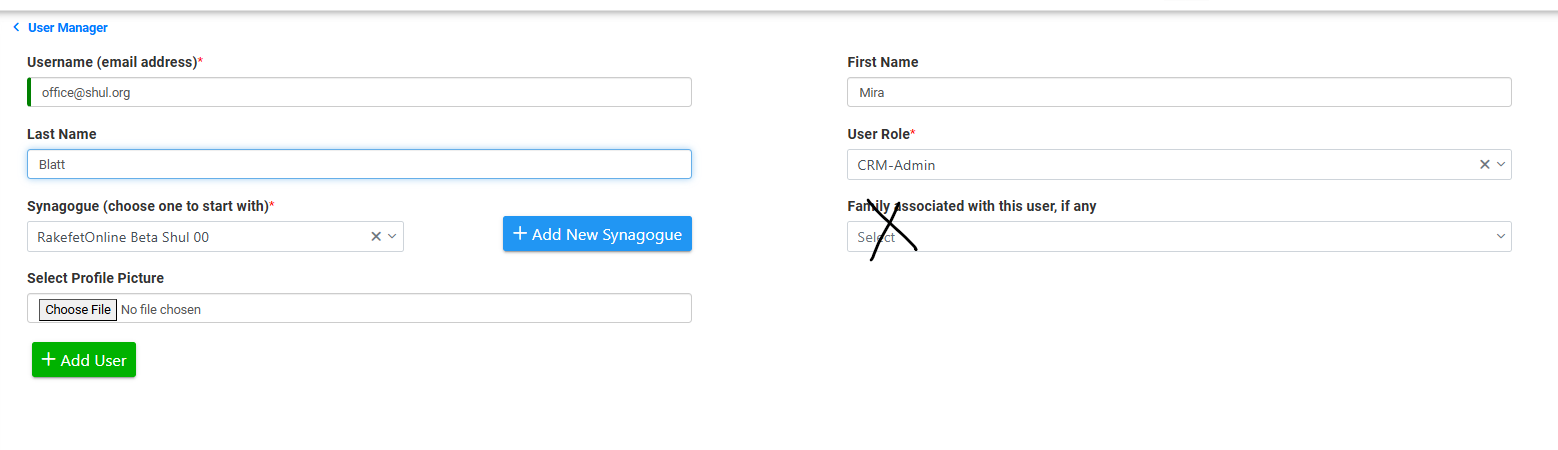
Go to Setup → Manage Users → Manage Users.
Click + Add User.
Enter the user's email address as the Username.
Enter the user's First Name and Last Name.
Select your Organization.
Choose the appropriate User Role.
Do not link the user to a Family when creating an office account.
(Optional) Upload a profile picture.
Click Submit.
The user will receive an email invitation to create their password and complete their first-time login.
Choosing the Correct User Role
The permissions an office user receives are determined by the role you assign. Create or customize roles to provide the appropriate level of access while maintaining security.
For more information, see Creating CRM Roles.
Need Help?
If your new office user does not receive the invitation email:
Verify the email address was entered correctly.
Ask the user to check their Junk or Spam folder.
Confirm that the user has not already been invited using the same email address.
Resend the invitation from Manage Users if needed.
Following these steps ensures your staff can securely access the administrative features they need while protecting your organization's data.
When adding an office side user, you screen will look like this: